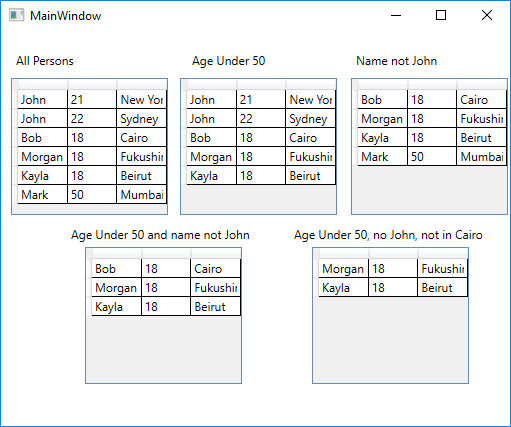
A composable interface lets a single type be both the leaf and the container in a structure, so consumers never need to distinguish between the two. This example builds a filtering system where IFilter<T> is implemented by both a single-predicate filter and a group of filters — the caller uses the same Pass() method whether it holds one rule or a nested tree of rules.
Filter Interface and Implementations
FilterGroup<T> implements the same interface as Filter<T>, so a group can itself be used anywhere a filter is expected — enabling unlimited nesting:
csharp
// IFilter<T> is implemented by both a single filter and a group of filters.
// The consumer never needs to know which one it has — it just calls Pass().
public interface IFilter<T>
{
    bool Pass(T element);
}

// Single filter — wraps a predicate
public class Filter<T> : IFilter<T>
{
    private readonly Predicate<T> _filterFunction;

    public Filter(Predicate<T> filterFunction) => _filterFunction = filterFunction;

    public bool Pass(T obj) => _filterFunction(obj);
}

// Composite filter — delegates to an inner list of IFilter<T>; all must pass
public class FilterGroup<T> : IFilter<T>
{
    private List<IFilter<T>> Filters { get; }

    public FilterGroup() => Filters = new List<IFilter<T>>();

    public FilterGroup(params IFilter<T>[] filters) => Filters = filters.ToList();

    public bool Pass(T element) => Filters.All(f => f.Pass(element));
}
Usage
A simple filter, a composite of two filters, and a nested composite all share the same invocation pattern:
csharp
public class Person
{
    public string Name { get; set; }
    public string City { get; set; }
    public int    Age  { get; set; }

    public Person(string name, int age, string city)
    {
        Name = name; Age = age; City = city;
    }
}

var persons = new List<Person>
{
    new Person("John",   21, "New York"),
    new Person("John",   22, "Sydney"),
    new Person("Bob",    18, "Cairo"),
    new Person("Morgan", 18, "Fukushima"),
    new Person("Kayla",  18, "Beirut"),
    new Person("Mark",   50, "Mumbai"),
};

// Single filter
IFilter<Person> filterAgeUnder50  = new Filter<Person>(p => p.Age < 50);
IFilter<Person> filterNameNotJohn = new Filter<Person>(p => p.Name != "John");
IFilter<Person> filterNotInCairo  = new Filter<Person>(p => p.City != "Cairo");

// Composite filter — both conditions must pass
IFilter<Person> filterCombined = new FilterGroup<Person>(filterAgeUnder50, filterNameNotJohn);

// Nested composite — a FilterGroup inside another FilterGroup works transparently
IFilter<Person> filterNested = new FilterGroup<Person>(filterCombined, filterNotInCairo);

// Apply — same .Pass() call regardless of whether the filter is simple or nested
var result1 = persons.Where(p => filterAgeUnder50.Pass(p)).ToList();
var result2 = persons.Where(p => filterCombined.Pass(p)).ToList();
var result3 = persons.Where(p => filterNested.Pass(p)).ToList();