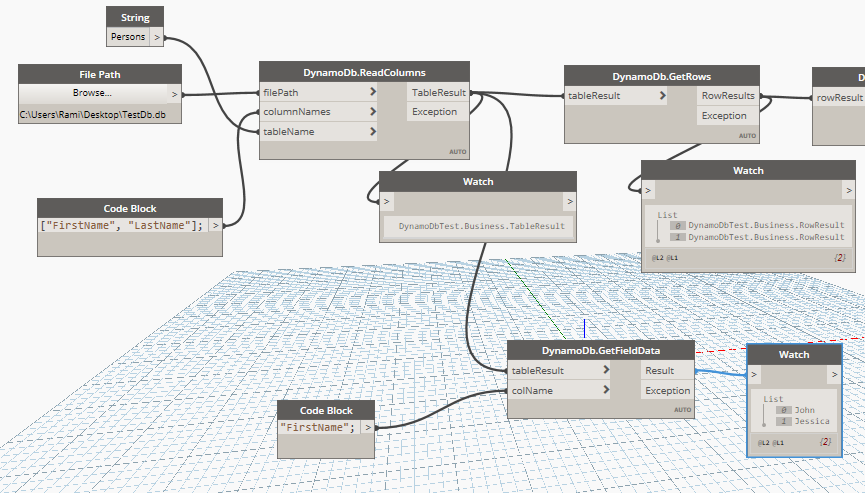
The previous article showed the minimal approach — reading the first column from a raw SQLiteDataReader. This article presents a proper scalable approach: a three-level model (field → row → table) that mirrors the database structure and exposes dedicated Dynamo nodes for each level of decomposition.
Business Models
FieldResult holds one cell value. RowResult wraps a row's fields. TableResult collects all rows. All three implement GetEnumerator so they can be iterated in LINQ or foreach:
csharp
// FieldResult — holds the column name and the value for one cell
public class FieldResult
{
    public string ColumnName { get; set; }
    public object Value      { get; set; }

    public FieldResult(string columnName, object value)
    {
        ColumnName = columnName;
        Value      = value;
    }
}

// RowResult — holds all fields for one database row
public class RowResult
{
    public List<FieldResult> Entries { get; set; } = new List<FieldResult>();

    public void Add(FieldResult field) => Entries.Add(field);

    public IEnumerator<FieldResult> GetEnumerator() => Entries.GetEnumerator();
}

// TableResult — holds all rows returned by a query
public class TableResult
{
    public List<RowResult> Rows { get; set; } = new List<RowResult>();

    public void Add(RowResult row) => Rows.Add(row);

    public IEnumerator<RowResult> GetEnumerator() => Rows.GetEnumerator();
}
Dynamo Nodes
Each static method maps to a Dynamo node. All use [MultiReturn] with an Exception port so errors surface in the graph without crashing Dynamo and losing work:
csharp
using Autodesk.DesignScript.Runtime;
using System.Data;
using System.Data.SQLite;

public static class DynamoDb
{
    // Build a SELECT query for specific columns from a table
    [IsVisibleInDynamoLibrary(false)]
    private static string CreateSelectQuery(List<string> fields, string table)
    {
        string cols = string.Join(",", fields.Select(f => quot;[{f}]"));
        return quot;SELECT {cols} FROM {table};";
    }

    // Connect and load specified columns into a typed TableResult
    [MultiReturn(new[] { "TableResult", "Exception" })]
    public static Dictionary<string, object> ReadColumns(
        string filePath, List<string> columnNames, string tableName)
    {
        try
        {
            TableResult table = new TableResult();

            using (var connection = new SQLiteConnection("Data Source=" + filePath))
            {
                connection.Open();
                var command = connection.CreateCommand();
                command.CommandText = CreateSelectQuery(columnNames, tableName);

                using (IDataReader reader = command.ExecuteReader())
                {
                    while (reader.Read())
                    {
                        RowResult row = new RowResult();
                        foreach (string col in columnNames)
                            row.Add(new FieldResult(col, reader[col]));
                        table.Add(row);
                    }
                }
            }

            return new Dictionary<string, object>
            {
                { "TableResult", table }, { "Exception", string.Empty }
            };
        }
        catch (Exception ex)
        {
            return new Dictionary<string, object>
            {
                { "TableResult", null }, { "Exception", ex.Message }
            };
        }
    }

    // Unwrap a TableResult to its list of rows
    [MultiReturn(new[] { "RowResults", "Exception" })]
    public static Dictionary<string, object> GetRows(TableResult tableResult)
    {
        try
        {
            return new Dictionary<string, object>
            {
                { "RowResults", tableResult.Rows }, { "Exception", string.Empty }
            };
        }
        catch (Exception ex)
        {
            return new Dictionary<string, object>
            {
                { "RowResults", null }, { "Exception", ex.Message }
            };
        }
    }

    // Unwrap a RowResult to its list of fields
    [MultiReturn(new[] { "FieldResults", "Exception" })]
    public static Dictionary<string, object> GetFields(RowResult rowResult)
    {
        try
        {
            return new Dictionary<string, object>
            {
                { "FieldResults", rowResult.Entries }, { "Exception", string.Empty }
            };
        }
        catch (Exception ex)
        {
            return new Dictionary<string, object>
            {
                { "FieldResults", null }, { "Exception", ex.Message }
            };
        }
    }

    // Extract all values from a specific column across all rows
    [MultiReturn(new[] { "Result", "Exception" })]
    public static Dictionary<string, object> GetFieldData(TableResult tableResult, string colName)
    {
        try
        {
            var result = tableResult
                .SelectMany(row => row.Entries)
                .Where(f => f.ColumnName == colName)
                .Select(f => f.Value)
                .ToList<object>();

            return new Dictionary<string, object>
            {
                { "Result", result }, { "Exception", string.Empty }
            };
        }
        catch (Exception ex)
        {
            return new Dictionary<string, object>
            {
                { "Result", null }, { "Exception", ex.Message }
            };
        }
    }

    // Decompose a single FieldResult into its column name and value
    [MultiReturn(new[] { "FieldValue", "ColumnName", "Exception" })]
    public static Dictionary<string, object> GetFieldData(FieldResult fieldResult)
    {
        return new Dictionary<string, object>
        {
            { "ColumnName", fieldResult.ColumnName },
            { "FieldValue", fieldResult.Value       },
            { "Exception",  string.Empty            }
        };
    }
}