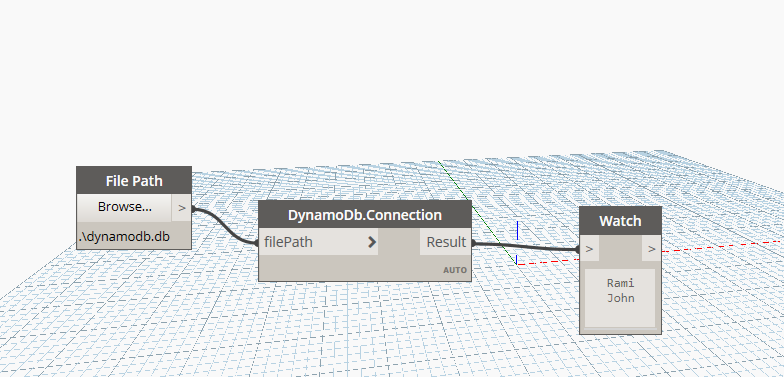
SQLite is a self-contained, serverless SQL database engine that stores its entire database in a single file on disk. .NET provides first-class SQLite support via the System.Data.SQLite NuGet package, making it easy to read structured data into Dynamo without standing up a database server.
Setting Up the Database
Use DB Browser for SQLite (free) to create a .db file, design tables, and add data visually. After each change press Write Changes to persist to disk. For this example, create a Persons table with columns Id, FirstName, LastName, and Age.
Dynamo C# Node
Install the System.Data.SQLite NuGet package in a C# Class Library project. The node accepts a file path, opens the connection, runs a SELECT query, and returns the first column from every row:
using Autodesk.DesignScript.Runtime;
using System.Data.SQLite;
using System.Text;

public static class DynamoDb
{
    [MultiReturn(new[] { "Result" })]
    [IsVisibleInDynamoLibrary(true)]
    public static Dictionary<string, object> Connection(string filePath)
    {
        if (string.IsNullOrEmpty(filePath))
            return new Dictionary<string, object> { { "Result", "" } };

        StringBuilder names = new StringBuilder();

        // SQLite connection string: "Data Source=<path>"
        using (var connection = new SQLiteConnection("Data Source=" + filePath))
        {
            connection.Open();

            SQLiteCommand command = connection.CreateCommand();
            command.CommandText = "SELECT [FirstName], [LastName], [Age] FROM Persons;";

            using (var reader = command.ExecuteReader())
            {
                while (reader.Read())
                {
                    // GetString(0) reads the first column — FirstName
                    names.AppendLine(reader.GetString(0));
                }
            }
        }

        return new Dictionary<string, object> { { "Result", names.ToString() } };
    }
}
The using block ensures the connection and reader are closed and disposed even if an exception occurs. See the follow-up article for a more scalable approach using typed business models.