Developers often point to architecture, language choice, or hardware when trying to explain why an application is slow — but code-level optimizations are frequently the first place to look. Before optimizing, you need to measure. Would 1 ms make a difference? In most production systems the answer is obviously yes.
BenchmarkDotNet
BenchmarkDotNet is the standard .NET benchmarking library. Install it from NuGet:
NuGet: dotnet add package BenchmarkDotNet
Setup
Decorate your benchmark class with [MemoryDiagnoser] to track allocations and [MediumRunJob] to control the iteration count. Mark the baseline method with [Benchmark(Baseline = true)] and use [ArgumentsSource] to supply parameterized inputs from a method:
using BenchmarkDotNet.Attributes;
using BenchmarkDotNet.Running;
using BenchmarkDotNet.Jobs;
using BenchmarkDotNet.Columns;

class Program
{
    static void Main(string[] args)
    {
        BenchmarkRunner.Run<ListHelper>();
    }
}

[MemoryDiagnoser]
[MediumRunJob, SkewnessColumn, KurtosisColumn]
public class ListHelper
{
    public IEnumerable<string> Password()
    {
        yield return string.Join(',', Enumerable.Range(1, 31).Select(n => n.ToString()));
    }

    [Benchmark(Baseline = true)]
    [ArgumentsSource(nameof(Password))]
    public byte[] HashPwd(string password)
    {
        byte[] salt = new byte[32];
        RNGCryptoServiceProvider.Create().GetBytes(salt);

        byte[] plainTextBytes = System.Text.Encoding.Unicode.GetBytes(password);
        byte[] combinedBytes   = new byte[plainTextBytes.Length + salt.Length];
        Buffer.BlockCopy(plainTextBytes, 0, combinedBytes, 0, plainTextBytes.Length);
        Buffer.BlockCopy(salt, 0, combinedBytes, plainTextBytes.Length, salt.Length);

        HashAlgorithm hashAlgo = new SHA256Managed();
        byte[] hash             = hashAlgo.ComputeHash(combinedBytes);

        byte[] hashPlusSalt = new byte[hash.Length + salt.Length];
        Buffer.BlockCopy(hash, 0, hashPlusSalt, 0, hash.Length);
        Buffer.BlockCopy(salt, 0, hashPlusSalt, hash.Length, salt.Length);

        return hashPlusSalt;
    }
}
Reading the Results
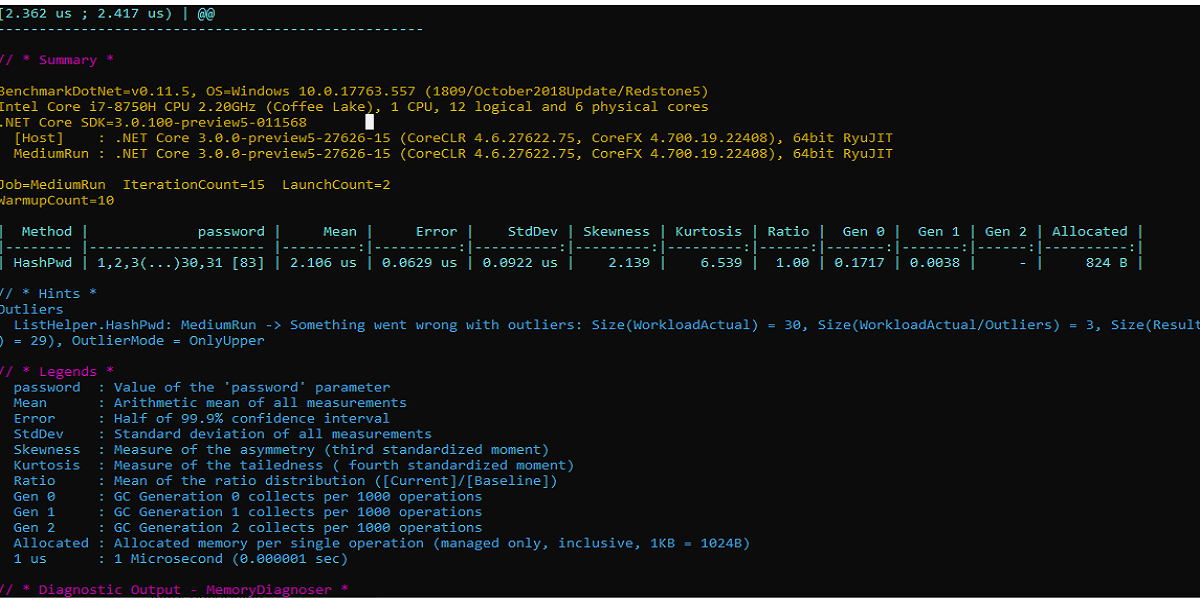
BenchmarkDotNet prints a results table with columns like Mean, Error, StdDev, Ratio, and memory columns Gen0 / Allocated. The Ratio column compares each method against the baseline. Skewness and kurtosis columns (from the SkewnessColumn / KurtosisColumn attributes) indicate distribution shape — high skewness can reveal occasional slow outliers.
Always run benchmarks in Release mode. BenchmarkDotNet enforces this and warns if you run from the debugger.