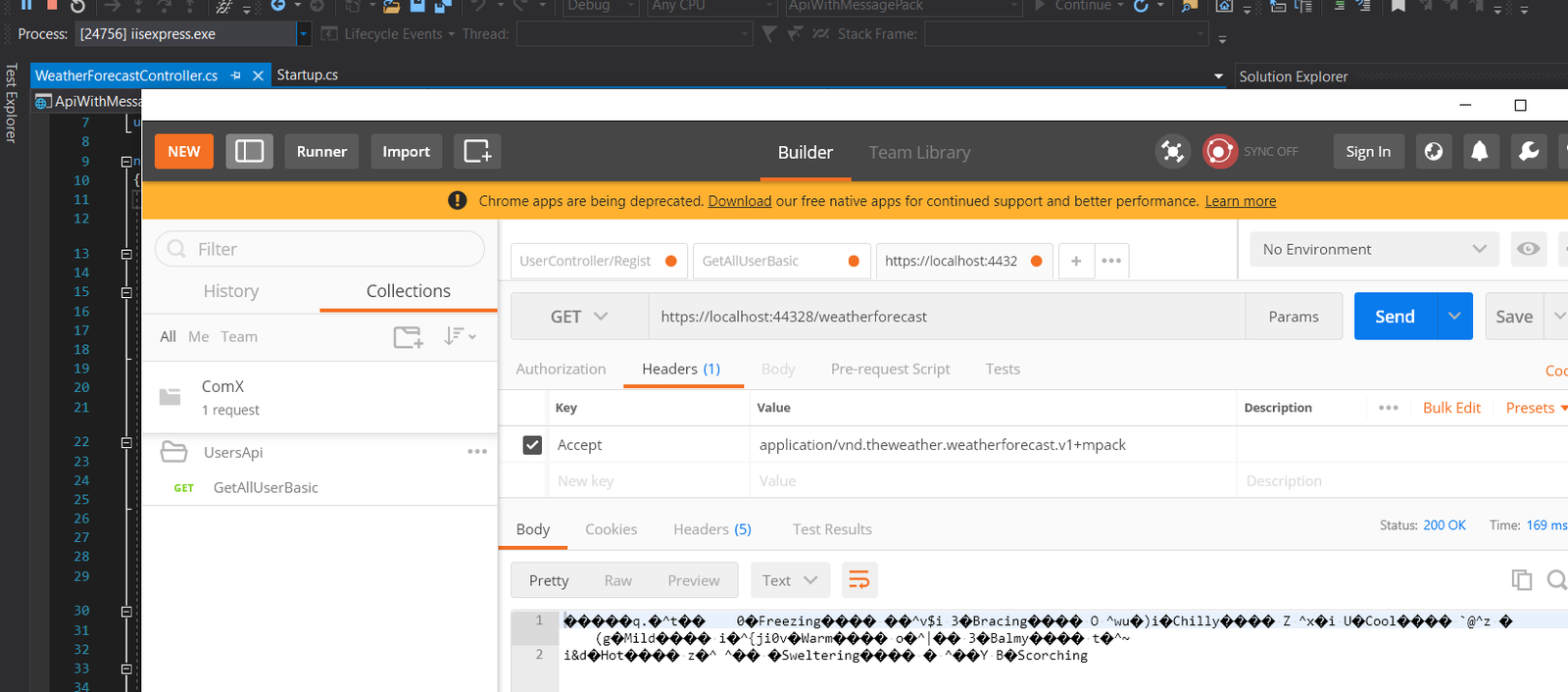
Payload size is one of the levers you can pull for HTTP API performance without touching infrastructure. MessagePack is "like JSON but smaller" — a compact binary serialization format. The MessagePack-CSharp benchmarks show it significantly outperforms JSON in both size and throughput.
This solution wires MessagePack into ASP.NET Core 3 via a custom InputFormatter / OutputFormatter pair on the server and a MediaTypeFormatter on the client. Five projects: Common, Models, Api, Client, and ClientTest.
AcceptStrictAttribute
ASP.NET provides [Produces] and [Consumes] but neither enforces the Accept header. When the header is absent, RespectBrowserAcceptHeader does not block execution either. This action filter fills that gap:
[AttributeUsage(AttributeTargets.Method, AllowMultiple = false, Inherited = false)]
public class AcceptStrictAttribute : Attribute, IActionFilter
{
    private const string AcceptKey = "Accept";

    public AcceptStrictAttribute(params string[] acceptValues)
        => AcceptValues = acceptValues;

    public string[] AcceptValues { get; }

    public void OnActionExecuted(ActionExecutedContext context) { }

    public void OnActionExecuting(ActionExecutingContext context)
    {
        if (!context.HttpContext.Request.Headers.ContainsKey(AcceptKey))
        {
            context.Result = new ObjectResult("The request does not contain the Accept header.")
                { StatusCode = (int)HttpStatusCode.NotAcceptable };
            return;
        }

        var values = context.HttpContext.Request.Headers[AcceptKey].ToList();
        bool found = AcceptValues.Any(v => values.Contains(v));

        if (!found)
        {
            context.Result = new ObjectResult(
                quot;No valid Accept header. Valid: [{string.Join(",", AcceptValues)}]")
                { StatusCode = (int)HttpStatusCode.NotAcceptable };
        }
    }
}
MessagePackInputFormatter
Registered in the api project — reads the request body stream and deserializes it withMessagePackSerializer.DeserializeAsync:
public class MessagePackInputFormatter : InputFormatter
{
    public MessagePackInputFormatter(params string[] mediaTypes)
    {
        foreach (string mt in mediaTypes)
            SupportedMediaTypes.Add(MediaTypeHeaderValue.Parse(mt));
    }

    protected override bool CanReadType(Type type) => true;

    public override async Task<InputFormatterResult> ReadRequestBodyAsync(InputFormatterContext context)
    {
        try
        {
            var memoryStream = new MemoryStream();
            await context.HttpContext.Request.Body.CopyToAsync(memoryStream);
            memoryStream.Seek(0, SeekOrigin.Begin);

            if (memoryStream.Length == 0)
                return InputFormatterResult.NoValue();

            object model = await MessagePackSerializer
                .DeserializeAsync(context.ModelType, memoryStream);

            return InputFormatterResult.Success(model);
        }
        catch
        {
            return InputFormatterResult.Failure();
        }
    }
}
MessagePackOutputFormatter
Registered in the api project — serializes the response object to a byte array and writes it to the response body:
public sealed class MessagePackOutputFormatter : OutputFormatter
{
    public MessagePackOutputFormatter(params string[] mediaTypes)
    {
        foreach (string mt in mediaTypes)
            SupportedMediaTypes.Add(MediaTypeHeaderValue.Parse(mt));
    }

    protected override bool CanWriteType(Type type) => true;

    public override async Task WriteResponseBodyAsync(OutputFormatterWriteContext context)
    {
        try
        {
            if (context.Object == null)
            {
                byte[] nullMP = new byte[] { MessagePackCode.Nil };
                await context.HttpContext.Response.Body.WriteAsync(nullMP);
            }
            else
            {
                byte[] bytes = MessagePackSerializer.Serialize(context.Object);
                await context.HttpContext.Response.Body.WriteAsync(bytes);
            }
        }
        catch (Exception ex)
        {
            context.HttpContext.Response.StatusCode = (int)HttpStatusCode.InternalServerError;
            await context.HttpContext.Response.Body.WriteAsync(Encoding.UTF8.GetBytes(ex.Message));
        }
    }
}
MessagePackMediaTypeFormatter
Used by client projects alongside the ReadAsAsync extension method from Microsoft.AspNet.WebApi.Client — handles both serialization and deserialization:
// Used by client projects — wraps ReadAsAsync deserialization
public sealed class MessagePackMediaTypeFormatter : MediaTypeFormatter
{
    public MessagePackMediaTypeFormatter(string mediaType)
        => SupportedMediaTypes.Add(MediaTypeHeaderValue.Parse(mediaType));

    public override bool CanReadType(Type type)  => true;
    public override bool CanWriteType(Type type) => true;

    public override async Task<object> ReadFromStreamAsync(
        Type type, Stream readStream, HttpContent content, IFormatterLogger formatterLogger)
    {
        if (readStream.Length == 0)
        {
            if (type.IsValueType && Nullable.GetUnderlyingType(type) == null)
                return Activator.CreateInstance(type);
            return null;
        }
        return await MessagePackSerializer.DeserializeAsync(type, readStream);
    }

    public override async Task WriteToStreamAsync(
        Type type, object value, Stream writeStream, HttpContent content, TransportContext transportContext)
    {
        byte[] nullMP = new byte[] { MessagePackCode.Nil };
        byte[] bytes  = value != null ? MessagePackSerializer.Serialize(value) : nullMP;

        using var memoryStream = new MemoryStream(bytes);
        memoryStream.Seek(0, SeekOrigin.Begin);
        await memoryStream.CopyToAsync(writeStream);
    }
}
Model and Media Type Constant
The [MessagePackObject] and [Key(n)] attributes are required. The MessagePackAnalyzer NuGet package will flag missing attributes before compilation. Keeping the vendor media type string in the same project as the model ensures they change together:
// Model decorated with MessagePack attributes
[MessagePackObject]
public class WeatherForecast
{
    [Key(0)] public DateTime Date         { get; set; }
    [Key(1)] public int      TemperatureC { get; set; }
    [Key(2)] public int      TemperatureF => 32 + (int)(TemperatureC / 0.5556);
    [Key(3)] public string   Summary      { get; set; }
}

// Keep the vendor media type close to the model it describes
public static class Constants
{
    public static class MediaTypes
    {
        public static class Output
        {
            public const string WeatherMPack =
                "application/vnd.theweather.weatherforecast.v1+mpack";
        }
    }
}
Startup Registration and Controller
Adding our formatters does not remove the defaults — JSON and other registered formatters remain available for clients that request them:
// Startup.ConfigureServices — register both formatters (existing formatters are kept)
services.AddControllers(options =>
{
    options.InputFormatters.Add(
        new MessagePackInputFormatter(Constants.MediaTypes.Output.WeatherMPack));
    options.OutputFormatters.Add(
        new MessagePackOutputFormatter(Constants.MediaTypes.Output.WeatherMPack));
});

// Controller action — enforce the Accept header and set the response content-type
[HttpGet]
[Produces(Constants.MediaTypes.Output.WeatherMPack)]
[AcceptStrict(Constants.MediaTypes.Output.WeatherMPack)]
public IEnumerable<WeatherForecast> Get() => _forecasts;
Client
The HttpClient is injected through the constructor — the same instance is reused in the integration test via WebApplicationFactory, which bootstraps the application in-memory:
public class WeatherForecastClient
{
    private readonly HttpClient _httpClient;

    public WeatherForecastClient(HttpClient httpClient)
        => _httpClient = httpClient;

    public async Task<WeatherForecast[]> GetAsync()
    {
        var request = new HttpRequestMessage(HttpMethod.Get, "WeatherForecast");
        request.Headers.Add("Accept", Constants.MediaTypes.Output.WeatherMPack);

        HttpResponseMessage response = await _httpClient.SendAsync(request);
        response.EnsureSuccessStatusCode();

        var formatters = new MediaTypeFormatter[]
        {
            new MessagePackMediaTypeFormatter(Constants.MediaTypes.Output.WeatherMPack)
        };

        return await response.Content.ReadAsAsync<WeatherForecast[]>(formatters);
    }
}