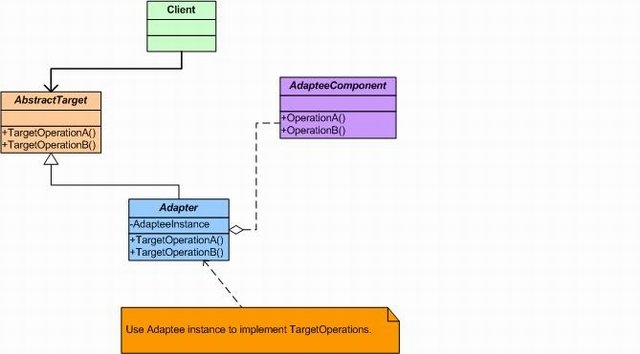
The adapter pattern allows incompatible interfaces to work together by converting one interface into another that the client expects. It acts as a translator between two classes — the adapter implements the target interface and internally delegates calls to the wrapped adaptee.
A common scenario: you receive a third-party library for an old gas-powered car that you cannot change, but your system is built around an IElectricCar interface. The adapter bridges the gap — it inherits IElectricCar and maps each command to the equivalent old-car method.
The Old Library
csharp
// Third-party library you cannot modify
public interface IOldCar
{
    void FillWithGas();
    void Accelerate();
    void Break();
}

public class OldCar : IOldCar
{
    public void FillWithGas()     => Console.WriteLine("Car is filling with gas");
    public void Accelerate()      => Console.WriteLine("Car accelerating");
    public void Break()           => Console.WriteLine("Car breaking");
}
The ECar Library
csharp
// Your new Electric Car library
public interface IElectricCar
{
    void VoiceCommandToSlowDown();
    void VoiceCommandToMoveForward();
    void RechargeBattery();
}

public class ElectricCar : IElectricCar
{
    public void RechargeBattery()          => Console.WriteLine("ECar recharging");
    public void VoiceCommandToMoveForward()=> Console.WriteLine("ECar moving forward");
    public void VoiceCommandToSlowDown()   => Console.WriteLine("ECar slowing down");
}
The Adapter
csharp
// Adapter: implements IElectricCar (the target interface)
// and delegates each call to the wrapped IOldCar (the adaptee)
public class OldCarAdapter : IElectricCar
{
    private readonly IOldCar _oldCar;

    public OldCarAdapter(IOldCar oldCar) => _oldCar = oldCar;

    public void RechargeBattery()           => _oldCar.FillWithGas();
    public void VoiceCommandToMoveForward() => _oldCar.Accelerate();
    public void VoiceCommandToSlowDown()    => _oldCar.Break();
}
Usage
With the adapter in place, both the real electric car and the adapted old car can be stored in the same List<IElectricCar> and driven through the same interface:
csharp
static void Main(string[] args)
{
    IOldCar oldMercedes = new OldCar();

    IElectricCar eMercedes             = new ElectricCar();
    IElectricCar oldMercedesAdapter    = new OldCarAdapter(oldMercedes);

    // Both are treated identically through the IElectricCar interface
    var fleet = new List<IElectricCar> { eMercedes, oldMercedesAdapter };
    fleet.ForEach(car => car.VoiceCommandToSlowDown());
}