 Audit.
Navigate.
Report.
Revit warnings, ISO 19650 checks, and your own quality rules in one audit. Click any finding to jump to the element, ask the AI assistant to write a new check, and export the audit to Excel for sign-off.
Get Digitteck Suite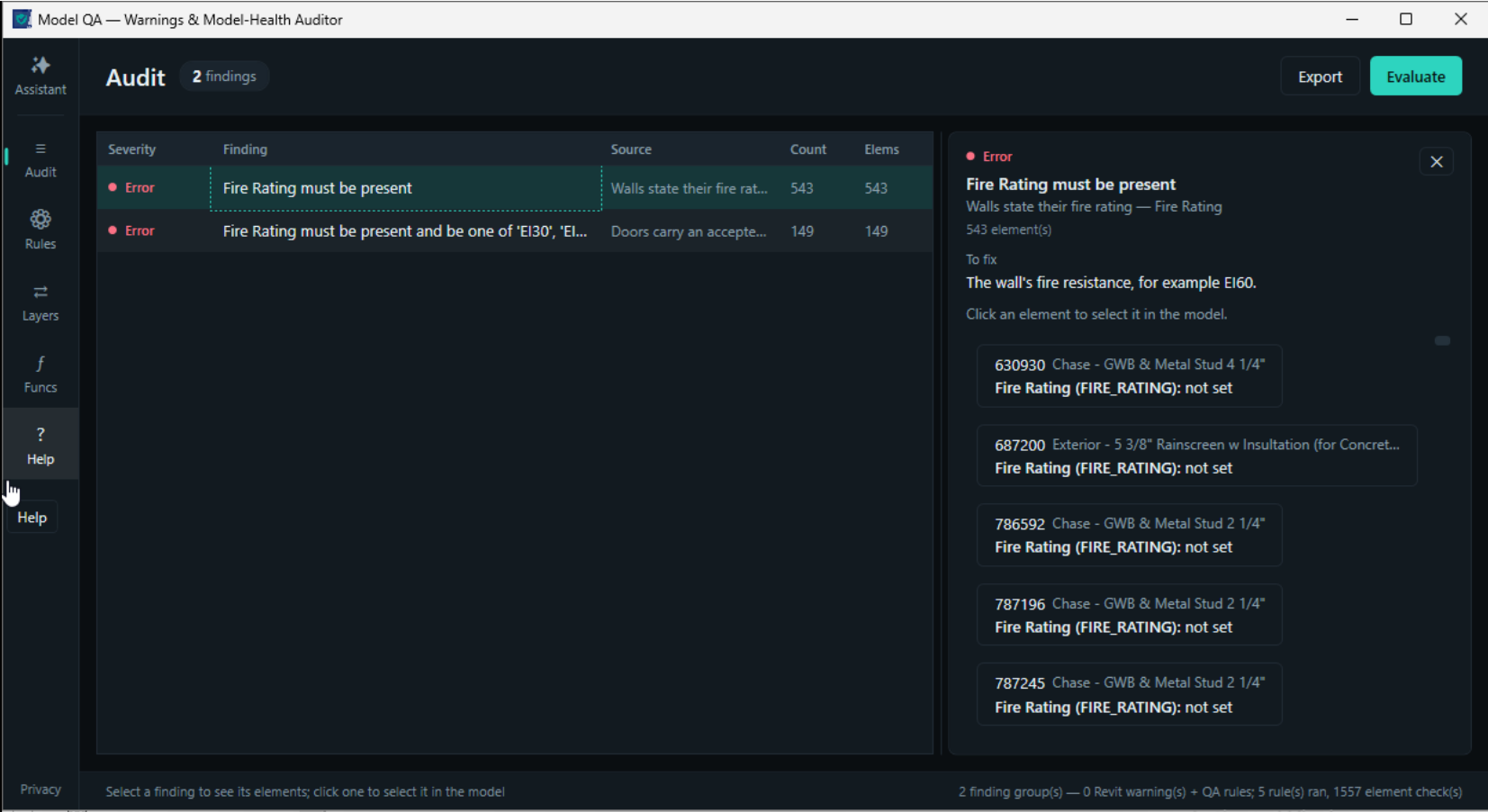
"See the whole
model's health.
At a glance."
Revit quietly accumulates warnings and hygiene problems that only surface at audit time. Model QA runs Revit's native warnings, a built-in ISO 19650 pack, and your own rules over the model — rooms, sheets, views, levels, worksets, families, links, and more — and shows exactly which elements fail and why.
Describe a new check in plain words, or import one from a client's buildingSMART IDS file.
Where the other Suite tools fix specific problems, Model QA sees the whole picture. It is the reporting and health companion that turns Digitteck Suite from a set of fixers into a standards and health platform.
Ask the AI
Describe the check.
Or show it a picture.
Type the check you want, or paste a screenshot, a markup, or a detail. The assistant writes the rule with the names actually in your model, asks before it saves anything, and you press Evaluate.
The assistant builds a rule from a plain-language prompt
01 / 02Features
One Audit View
See Exactly What Failed
Click-to-Navigate
22 Built-in Rules
Custom Rules Without Code
30 Built-in Functions
AI Assistant
IDS Import
Shareable Standards
Excel Export
Read-Only & Safe
Inside Model QA
Audit
Everything in one view.
- Revit warnings and your QA findings in one list, each with a severity and an element count.
- Select a finding to see every element it flagged, the value that failed, and how to fix it.
- Click an element and Revit selects it and shows it.
Your AI,
your choice
and your data
Pick the model. Claude, OpenAI (GPT-6 and newer), Google Gemini — or a model running on your own PC through Ollama, where nothing leaves the machine. Keys and models are set once in Settings, and one picker in the assistant chooses between them.
Keys stay yours. They are encrypted on your PC, for your Windows account only.
Parameter values are never sent to the AI. The only exceptions are room and level names that match a word you asked it to look up, and images you choose to send.
Every change the assistant proposes waits for your Allow. A turn can be stopped at any time.
Model QA is exclusively available as part of Digitteck Suite. You must have an active Digitteck Suite subscription from the Autodesk App Store and be logged into Revit with your Suite subscription email.
Model QA is part of
Digitteck Suite
Get it on Autodesk App StoreIncludes all five tools · Requires Revit for Windows