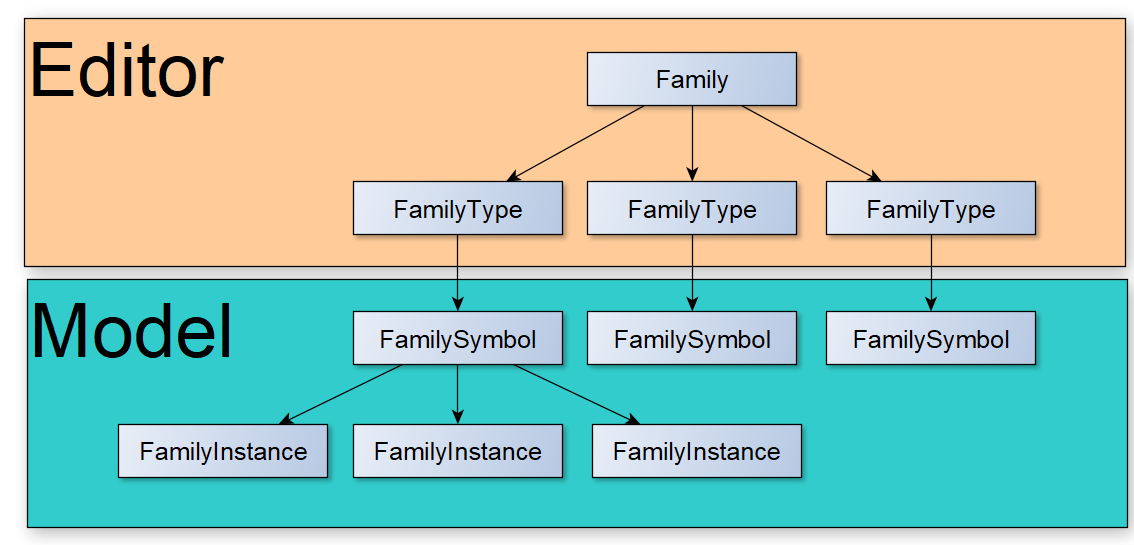
Understanding the distinction between Family, FamilySymbol, and FamilyInstance is fundamental to writing Revit add-ins that manipulate elements correctly.
Family Structure
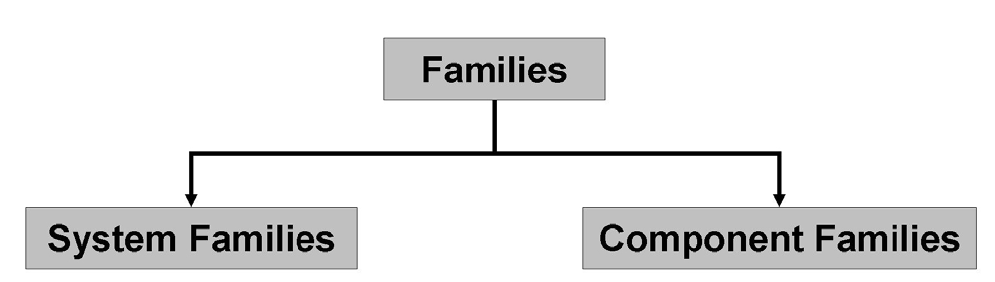
Revit has two family categories:
- Component Families — user-created, loadable families (doors, windows, furniture). Represented in the API as
Family,FamilySymbol,FamilyInstance. - System Families — built-in families (walls, dimensions, floors). Users can only create derived types. Represented as
HostObjAttributes(type) andHostObject(instance).
Definitions
- Family — the top-level definition; a collection of types (e.g. "Round Table").
- Family Type — fixes some parameters of the family (e.g. "Round Table — 3 m diameter"). Lives inside the Family Editor.
- FamilySymbol — the compiled family type loaded into the model space. Called "Type" in the Revit UI.
- FamilyInstance — a placed instance of a FamilySymbol in the model.
In the Model
Getting instances
csharp
// Getting component family instances and system family type instances
List<FamilyInstance> allInstances = new FilteredElementCollector(document)
    .OfClass(typeof(FamilyInstance))
    .OfType<FamilyInstance>()
    .ToList();

// Wall is a dedicated class for a system family — query it directly
List<Wall> wallInstances = new FilteredElementCollector(document)
    .OfClass(typeof(Wall))
    .OfType<Wall>()
    .ToList();

// HostObject is the base class for all system family instances (Wall, Floor, Ceiling, etc.)
List<HostObject> systemFamilyInstances = new FilteredElementCollector(document)
    .OfClass(typeof(HostObject))
    .OfType<HostObject>()
    .ToList();
Getting families
csharp
// Getting Family objects (the top-level definition, not instances)
List<Family> allFamilies = new FilteredElementCollector(document)
    .OfClass(typeof(Family))
    .OfType<Family>()
    .ToList();
Getting system family types
csharp
// Getting system family types (HostObjAttributes is the API class for system family types)
var systemTypes = new FilteredElementCollector(document)
    .OfClass(typeof(HostObjAttributes))
    .ToList();
Getting a specific FamilySymbol
csharp
// Getting a specific FamilySymbol by FamilyName and type Name
FamilySymbol mullionSymbol = new FilteredElementCollector(document)
    .OfClass(typeof(FamilySymbol))
    .OfType<FamilySymbol>()
    .Where(x => x.FamilyName == "Rectangular Mullion" && x.Name == "64 x 128 rectangular")
    .FirstOrDefault();
Getting all symbols of a family
csharp
// Getting all FamilySymbols that belong to a specific Family using FamilySymbolFilter
List<FamilySymbol> allMullionSymbols = new FilteredElementCollector(document)
    .WherePasses(new FamilySymbolFilter(mullionSymbol.Family.Id))
    .OfType<FamilySymbol>()
    .ToList();
Getting all instances of a symbol
csharp
// Getting all placed instances of a specific FamilySymbol
var mullionInstances = new FilteredElementCollector(document)
    .WherePasses(new FamilyInstanceFilter(document, mullionSymbol.Id))
    .OfType<FamilyInstance>()
    .ToList();
Navigating instance → symbol → family
csharp
// Navigating from instance → symbol → family
FamilyInstance aRandomMullion = allInstances
    .Where(x => x.Name == "64 x 128 rectangular")
    .FirstOrDefault();

Family mullionFamily = aRandomMullion.Symbol.Family;
In the Family Editor
Inside the Family Editor, FamilyTypes (not FamilySymbols) are accessible throughdocument.FamilyManager:
csharp
// Inside the Family Editor — accessing FamilyManager types
string name = document.FamilyManager.CurrentType.Name;
FamilyTypeSet types = document.FamilyManager.Types;