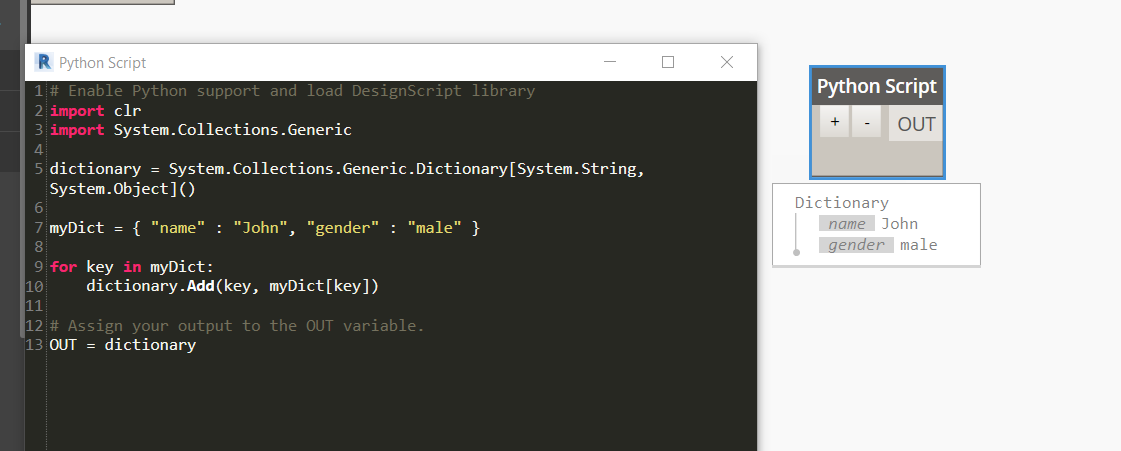
Dynamo supports two approaches to working with dictionaries: native Dynamo dictionary nodes, and Python dictionaries inside a Python Script node. The problem arises when you build a dictionary in Python and try to expose it through the OUT port — the rest of the graph cannot consume a raw Python dict as a Dynamo Dictionary.
The Problem
Placing a Python dict in the OUT node outputs a raw Python object. Downstream Dynamo nodes — including Dictionary.ValueAtKey — cannot interact with it:
# Attempting to output a plain Python dict from a Dynamo Python node
result = {
    "WallType": "Basic Wall",
    "Height": 3000,
    "Width": 200,
}

OUT = result
# Result: Dynamo outputs the Python dict object — downstream nodes cannot
# consume it as a Dynamo Dictionary and the watch node shows a raw Python object.
The Solution
Dynamo dictionaries are .NET Dictionary<TKey, TValue> from System.Collections.Generic. Import and use this type directly from your Python node to produce output the graph can consume:
import clr
clr.AddReference('System')
from System.Collections.Generic import Dictionary

# Use a .NET Generic Dictionary — this is what Dynamo natively understands
result = Dictionary[str, object]()
result["WallType"] = "Basic Wall"
result["Height"]   = 3000
result["Width"]    = 200

OUT = result
# Now Dynamo treats the output as a proper Dictionary node
# and downstream nodes (Dictionary.ValueAtKey, etc.) work correctly.
Typed Values
When all values share a type, use a more specific type parameter for better interop with typed Dynamo nodes:
import clr
clr.AddReference('System')
from System.Collections.Generic import Dictionary

# You can also use a more specific type parameter if all values share a type
heights = Dictionary[str, float]()
heights["Ground Floor"] = 3000.0
heights["First Floor"]  = 2800.0
heights["Second Floor"] = 2800.0

OUT = heights