HTTP is the protocol underlying the web. The HttpClient class in .NET exposes all the building blocks for sending requests and reading responses. Understanding the different content types and the handler architecture unlocks both production-ready usage and testable designs.
Base Address
Pass an absolute base URI to HttpClient and all subsequent calls can use relative paths:
// Set a base address so subsequent calls use relative paths
var client = new HttpClient() { BaseAddress = new Uri("https://developer.api.autodesk.com/") };
Content Types
The request body is set via request.Content. .NET provides several typed content classes — choose based on the encoding the server expects.
A. FormUrlEncodedContent
Sends key/value pairs encoded as application/x-www-form-urlencoded. Typical for OAuth token requests:
// A. FormUrlEncodedContent — wraps key/value pairs as application/x-www-form-urlencoded
string relativeUri = "authentication/v1/authenticate";
HttpRequestMessage request = new HttpRequestMessage(HttpMethod.Post, relativeUri);
request.Headers.Clear();
request.Content = new FormUrlEncodedContent(new List<KeyValuePair<string, string>>
{
    new KeyValuePair<string, string>("client_id",     FORGE_CLIENT_ID),
    new KeyValuePair<string, string>("client_secret", FORGE_CLIENT_SECRET),
    new KeyValuePair<string, string>("grant_type",    "client_credentials"),
    new KeyValuePair<string, string>("scope",         scopesStr)
});

HttpResponseMessage response = await _client.SendAsync(request).ConfigureAwait(false);
B. StringContent
Sends a string (usually serialized JSON). Set the Content-Type header explicitly — do not rely on the default:
// B. StringContent — serialize an object to JSON and set the content type
string serialized = JsonConvert.SerializeObject(person);

HttpRequestMessage request = new HttpRequestMessage(HttpMethod.Post, relativeUri);
request.Headers.Clear();
request.Headers.Add("Authorization", "Bearer " + bearer.AccessToken);

request.Content = new StringContent(serialized);
request.Content.Headers.Clear();
request.Content.Headers.Add("Content-Type", "application/json");
C. StreamContent
Sends binary data in chunks — unlike ByteArrayContent, which loads the entire payload into memory first:
// C. StreamContent — send binary data in smaller chunks (avoids loading into memory)
using (FileStream stream = new FileStream(imagePath, FileMode.Open, FileAccess.Read, FileShare.Read))
{
    string relativeUri = "buckets/myimage.png";
    int.TryParse(stream.Length.ToString(), out int fileLength);

    HttpRequestMessage request = new HttpRequestMessage(HttpMethod.Put, relativeUri);
    request.Headers.Clear();
    request.Headers.Add("Authorization", "Bearer " + bearer.AccessToken);

    request.Content = new StreamContent(stream);
    request.Content.Headers.Clear();
    request.Content.Headers.Add("Content-Length", quot;{fileLength}");
    request.Content.Headers.Add("Content-Type", "image/png");

    HttpResponseMessage response = await _client.SendAsync(request).ConfigureAwait(false);
}
Mocking with FakeMessageHandler
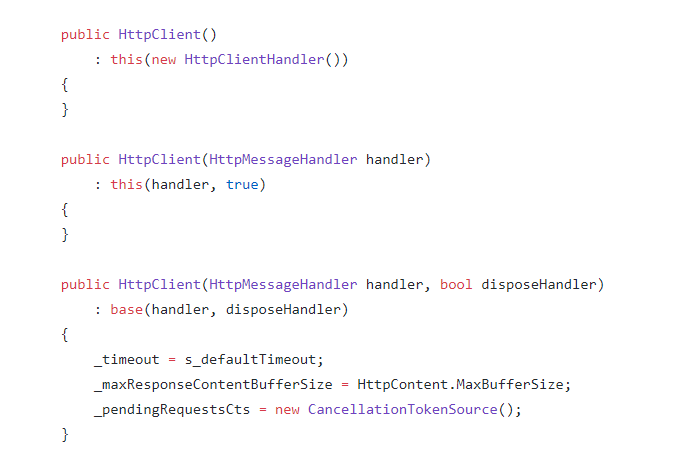
HttpClient accepts an HttpMessageHandler in its constructor. HttpClientHandler is the default production handler; in tests you can substitute a fake that returns a canned response without hitting the network:
// D. FakeMessageHandler — replace the real handler for unit tests
public class WorkHttpClient : HttpClient
{
    public WorkHttpClient(HttpMessageHandler httpMessageHandler) : base(httpMessageHandler, true) { }
}

public class FakeMessageHandler : HttpMessageHandler
{
    protected override Task<HttpResponseMessage> SendAsync(HttpRequestMessage request, CancellationToken cancellationToken)
    {
        return Task.FromResult(new HttpResponseMessage(System.Net.HttpStatusCode.OK)
        {
            Content = new StringContent("Hello")
        });
    }
}

class Program
{
    static async Task Main(string[] args)
    {
        var serviceCollection = new ServiceCollection();
        serviceCollection.AddScoped<HttpClient, WorkHttpClient>();
        serviceCollection.AddScoped<HttpMessageHandler, FakeMessageHandler>();
        ServiceProvider serviceProvider = serviceCollection.BuildServiceProvider();

        HttpClient client = serviceProvider.GetRequiredService<HttpClient>();
        HttpResponseMessage response = await client.GetAsync("http://localhost/testfakeclient");
        var respContent = await response.Content.ReadAsStringAsync();

        Console.WriteLine(quot;{respContent} World!"); // → Hello World!
    }
}